|

The Photo Channel is a channel built in with the Wii console which lets you view photos on the console. You are able to do many things with them, such as painting on them, adding visual effects, and even turning them into puzzles. It will also let you view a sideshow as well.
Development
The Photo Channel was developed by Nintendo Entertainment Analysis and Development. It was designed to be built into the Wii. The principle foundation for the Photo Channel lied in the Wii's SD card slot. With it, users could upload their pictures and videos they've taken with a camera onto the Wii and view them. During the early stages of development, the director created a demo of how he wanted the channel to be. He showed his work to Nintendo president Satoru Iwata, who liked the special effects that could be added to the photograph. When developing the channel, the creators wanted to make it so that the user could upload an image quickly. Their goal was to make it faster than a PC, which they were able to accomplish.
Interestingly, the Photo Channel was the first channel that, during development, the developers made use of the Wii Remote's pointer function. In retrospect, the developers noted that the pointer controls worked better than they originally anticipated. With the Wii Remote, the player would be able to increase and decrease the size of stamps as well as rotate them simply by performing the appropriate gestures with the Wii Remote. Early on in development, the designers agreed that they would add a multiplayer feature though in order to do so they would have to overcome various obstacles. One of the programmers recalled how when people pressed the button at the same time during multiplayer, the channel would break. In the finalized version this problem is obviously removed.
Features
Photo Viewer
The Photo Channel allows you to view photos on your SD Card. The photos can only be in the jpeg format. You can zoom in or out of the photos. The channel also lets you view the pictures on your Wii Message Board and edit them. Along with photos, you may also watch videos in the AVI format. A Slide Show can also be played of all the photos on your SD Card or Wii Message Board with pre-loaded songs or your own, which must be in the M4A (AAC) format (originally MP3 in the 1.0 version).
"Fun!" Section
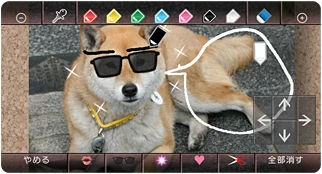

Editing a photo of a dog.
Along with viewing your photos, you can also edit and play with them. You can change the "mood" of the photo with different levels of brightness, black and white, zap (inverted colors), or hard-boiled (oversaturated and black & white). Another thing you can use is the Doodle function, which lets you draw and put stamps on your pictures. This is identical to Mario Paint. The last option you can do is a game where you complete a puzzle out of your photo. You can select different sizes of puzzles that range from 6 pieces to a whopping 192 if the 2 Button is held down when starting a 48 piece puzzle.
Soundtrack
Trivia
- The Photo channel may have been made to be a competitor to the PlayStation 3’s Photo Gallery feature.
- The "Calm" slideshow music's actual name is Dolly Suite, Op.56 by Fauré Gabriel. This song was originally made in 1892.
- The rocket selection that erases all the doodles from your picture is taken directly from Mario Paint.
- The Brightness and Hard-boiled mood options have eight different levels of effect that you can apply.
- Applying the different settings to your photos and videos will change the Photo Channel music and the sound in your videos to be distorted in different ways. Brightness will add an echo effect, Zap will make the sound all weird, Black & White will make the sound similar to an old TV, and finally Hard-boiled will make the pitch of the sound very low.